Friday, October 12, 2012

Data Centers

When businesses turn to offsite companies to handle the safe keeping of their data through the cloud, the companies that they are contracting operate out of data centers.
 
These Data Centers that specialize in storage are usually industrial sized operations. Maintaining the proper equipment to not only hold all of this data, but also to safeguard it can be a very complex and expensive task. State of the art severs and hardware must be used in order to hold the volume of data involved in this type of storage. Some businesses may want to use their own equipment, in which case they have the option to rent a space within a Data Center to utilize the optimum environment that these centers provide.


The rooms in which the equipment is used to hold this information must be carefully climate controlled. If the air is too moist, there is the chance of condensation building up on the machines. If the air is too dry, there is the risk of static electricity build up. To avoid this, the humidity must remain within 40 to 55%.  The temperature must be kept within 61-75 degrees Fahrenheit. Because computer components produce very high amount of heat, this can be a difficult task. The equipment used in these data centers must be constantly serviced and replaced while maintaining the integrity of the data. The storage and upkeep of this technology is a full time job!
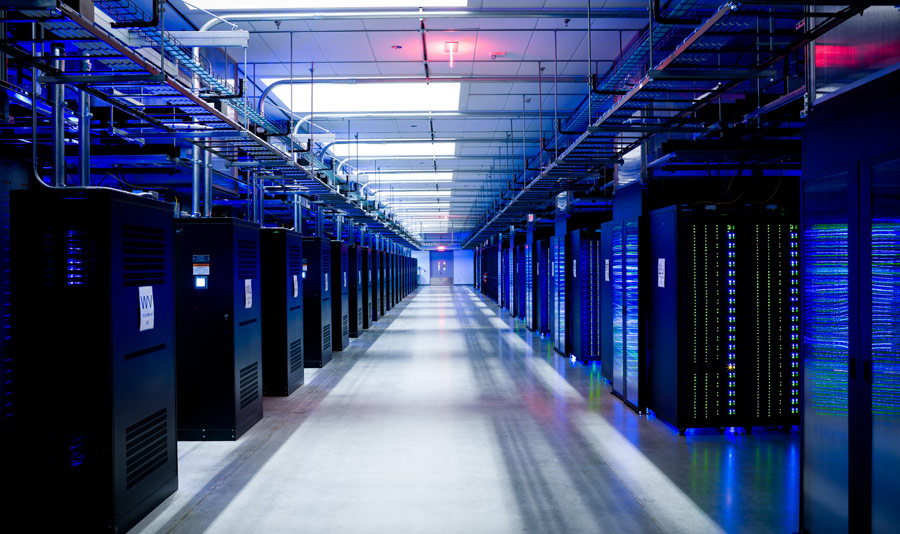
In addition to perfect humidity and temperature, redundant power and ISP (Internet Service Provider) is a must. Imagine how devastating a power outage can be on a business and you will see the benefit of data centers. UPS's (Uninterrupted Power Supplies, also known as batteries) are used to distribute clean power to all equipment in the data center. These batteries also store power in case a brief power outage happens.  Most data centers will use power that comes from multiple power stations to avoid outages and as a third way to prevent power loss, most data centers have a generator. Furthermore, redundant ISPs in a data center are a must to have dependable access to data.

Not all data centers are created equal. TechFarmer can help you choose the best one for your business!

Monday, October 8, 2012

Cloud Storage


As businesses grow and expand, so does the technology and data that they use. Applications, software, and information used by businesses play a key role in their productivity and success. Much of this data is sensitive and its integrity is of the highest importance. Backing this information up and ensuring its safety is a key factor in keeping a company running at peak efficiency. Data must be protected from such threats as power outages, environmental issues like fire or water damage, and theft, as well as components inevitably failing.

There are many methods in which to do this. A growing trend amongst small and medium sized businesses is to utilize cloud storage to routinely back up their data.

The term cloud storage refers to using an offsite company to handle the safe storage of files and data through the internet. Through the use of the cloud, businesses can focus on doing what they do best and let the data center professionals deal with the task of keeping all of this information intact as well as all of the expenses involved.

As with many things, this may not be the perfect solution for all businesses. A thorough analysis of your particular business technology as well as data use is necessary. It is important to understand that even though your data is available in the cloud, if you have an internet or power outage locally, the data will not be accessible. In addition, the speed that your local ISP delivers will play a big role in data retrieval. There are always ways to resolve those issues and TechFarmer is happy to analyze your current environment as well as suggest the most fitting solution.

Monday, October 1, 2012

Practice Management Software

Among many businesses, especially in the medical field, the organization and handling of client and work related information has become a time intensive and highly complex task. Before the commercial use of computing, patient records, work orders, client information and other business essential documents were all recorded and cataloged by hand. This method was highly susceptible to human error and took many working hours to coordinate.

Thanks to modern technology, many of these tasks are now handled at almost instantaneous speeds by specially designed software. The medical field is one such example of an area in which these programs have become an industry standard.

Practice Management Software is a company wide application that handles a diverse variety of tasks. This software, if professionally implemented, can generate reports, schedule appointments, and update as well as store electronic patient records. PM systems can also do such tasks as coordinating bill payment through insurance providers. There are many more uses for this software, all of which take less time for staff to complete, allowing them more time to focus on the job at hand.

TechFarmer supports many medical companies with different and unique needs. Selecting the most effective Practice Management Software as well as its implementation and upkeep has been an area of expertise. Let us help you in selecting the best one for your business!

Thursday, September 27, 2012

Advanced Format Drives

Ever since hard drives were first developed and used over fifty years ago, the data held in them has been stored in the same manor. Up until the emergence of Advanced Format Drives, hard drives would store data in 512 or 520 byte sectors. A sector being the section of a hard drive disk track where chunks of data are stored. Recently a need has been addressed for the development of larger drives and increased data storage. Advanced format drives combine eight of the older 512 byte sectors into single, larger 4096 byte sectors.

On a traditional drive, after each sector of data was filled, there was additional data added for error correction, addressing, and other functions. By combining these smaller pockets of data into larger advanced format data sectors, the amount of additional data needed is significantly reduced thus making more room for actual storage.
 
What this means is that a traditional 500GB hard drive, if switched over to Advanced Formatting, will be expanded to roughly 550GB. Of course the hard drive will be shipped already formatted, so the amount of drive space that is advertised is the actual drive space that you will get. This new formatting technique will give manufacturers the ability to produce larger and larger drives for us as consumers in the future.
For the most part, the Advanced Format drives should be Plug-and-Play. However, in some cases they will require a driver to be installed. It all depends on the drive manufacturer and the operating system of the computer.

Wednesday, September 12, 2012

Online Tracking

As we navigate the Internet we create trends by viewing pages and inputting information. The patterns of websites and online services that we visit can say quite a bit about ourselves such as our interests, our age and gender, where we live, and most importantly, where and how we like to spend our money.

Advertising companies have created a way to track our online movements revealing all of this information. They then create profiles of us describing our interests. This is a form of behavioral targeting.

Using the gathered information, these third party companies will tailor ads that we see to coincide with the profile that they have built on us. Ever wonder why the ads in the side bars of your email are applied to you in some way? Depending on the location and demographics that are on file about us, we may even be given different prices for certain products.
The legalities of this type of tracking are still in dispute.  Not everyone may be bothered by this because it can be very convenient to see advertisements that apply to us. On the other hand, some people may view this as a violation of privacy. The good news is that there are ways in which we can view these third party websites as they track us. We can even block ourselves from being tracked.

There are many programs available to do this. For example, Firefox has several add-on programs for this purpose. One of these programs is called Collusion, which is very well designed and is an aesthetically pleasing addition to a web browser. As a user starts to browse web pages and as third party companies start to track their movements, Collusion will create a map showing who is doing the tracking along with a brief description of the company and at what point they were picked up. Collusion also offers the option to block this tracking. Regardless of whether or not we mind having our online lives tracked, there are resources available to put a stop to it if desired.

Thursday, September 6, 2012

The Future of Laptops

One of the many recent computing trends has been the use of tablets. There have been many reasons for the tablet’s rise in popularity. They are highly mobile, light weight and can be integrated into our lives with relative ease. The boot up time of these computers is almost instantaneous, which means no staring at the loading screen while you wait to access email or other services. As convenient as these devices are, they don’t have many of the features that traditional lap tops do. Therefore they arguably pose little threat to the laptop industry and are in a class of their own.

In order to bring the power of a laptop computer into today’s market which demands mobility and speed, a different class of laptop has emerged called the Ultrabook. These machines are lightweight and durable thanks to the fact that they don’t use Hard Disk Drives (HDD) and other components that traditional laptops do. The majority of Ultrabooks utilize what are called Solid State Drives (SSD) that have no moving parts and are not only much smaller, but also last much longer. In addition, Ultra books use lower power processors that can boot up almost instantaneously, much like tablets.
One of the key differences between the Ultrabook and the laptop is the fact that almost no Ultrabooks have optical disk drives. The use of CD’s to transfer data or to install programs is becoming unnecessary to many users, as most of these can be accessed via the cloud. By doing away with the disk drive all together, Ultrabooks have even less moving parts to fail making it smaller and lighter in weight.  

With the ease of use, convenience and durability, the Ultrabook can easily become the future standard of laptops.

Tuesday, September 4, 2012

Is this Really 4G?


Most mobile phone carriers have been advertising themselves as having the latest 3G or LTE networks. Many service providers are even marketing their products as being “4G”. What exactly does this mean to us as the consumer and what even is 3G or 4G?
3G refers to the type of network in which that particular phone or service operates.  3G stands for 3rd Generation. All of the hardware, standards, and technology in general that make up a 3rd generation cell phone network are referred to collectively as 3G. What this means is that if a phone is 3G capable, it makes full use and takes advantage of all of these particular technologies. As various privately owned companies build devices and networks to communicate with each other, standards are applied that ensure that all of the technology is compatible. An example is the Wi-Fi or Bluetooth standards. If there were no standards in place, each manufacturer of laptop or mobile device could have their own unique frequency’s or protocols, and nothing would be compatible. Thanks to standards such as Wi-Fi, almost anyone with a wireless card, regardless of the brand, can walk into a coffee shop and get connected. Organizations such as the ITU or International Telecommunication Union create and implement these standards.

4G on the other hand, is referring to the 4th Generation of wireless networks, but is a little more complicated. According to the ITU, one of the requirements for a service to be 4G is that it has to provide data speeds at a minimum of 100 Mbit/second, compared to the 3G’s minimum requirement of 3.8 Mbit/second. This is fast! However, despite being marketed as 4G and being significantly faster than 3G, today’s 4G services don’t come close to this speed. They will eventually, once 4th Generation networks converge and become more established. 4G phones in today’s marketplace are considered to be 4G due to the fact that they use a more efficient method for transporting data than the previous 3G. This technology has the potential for extremely high speeds. As these mobile communication networks continue to expand, we as consumers should start to see this type of performance increase in the future.